


Download Hype Machine – New Music Discovery, Music Blog Aggregator, Artist Discovery Tool
Overview
Hype Machine is a desktop application designed to streamline music discovery by aggregating content from music blogs worldwide. The software enables users to explore emerging artists and independent tracks that may not appear on mainstream platforms. Its primary purpose is to serve as a curated gateway to fresh, under-the-radar music, helping users stay ahead of the curve in the evolving music landscape.
The target audience includes music enthusiasts, independent artists, bloggers, and professionals in the music industry seeking new content. The app connects directly to the Hype Machine blog network, drawing real-time updates from contributors across different countries and genres. This global reach allows users to discover regional music trends and niche styles.
Real-world usage scenarios include casual listening during work, research for music curation, and identifying upcoming talent. The software is particularly useful for DJs, content creators, and labels scouting for new voices. While the developer did not provide additional background, the app’s foundation lies in the established Hype Machine website, known for its music blog aggregation.
The desktop version enhances accessibility, allowing uninterrupted browsing and listening without mobile limitations.
Key Features & Capabilities
- Global Music Blog Aggregation – Pulls content from music blogs across the world, offering real-time updates on new tracks and artist releases.
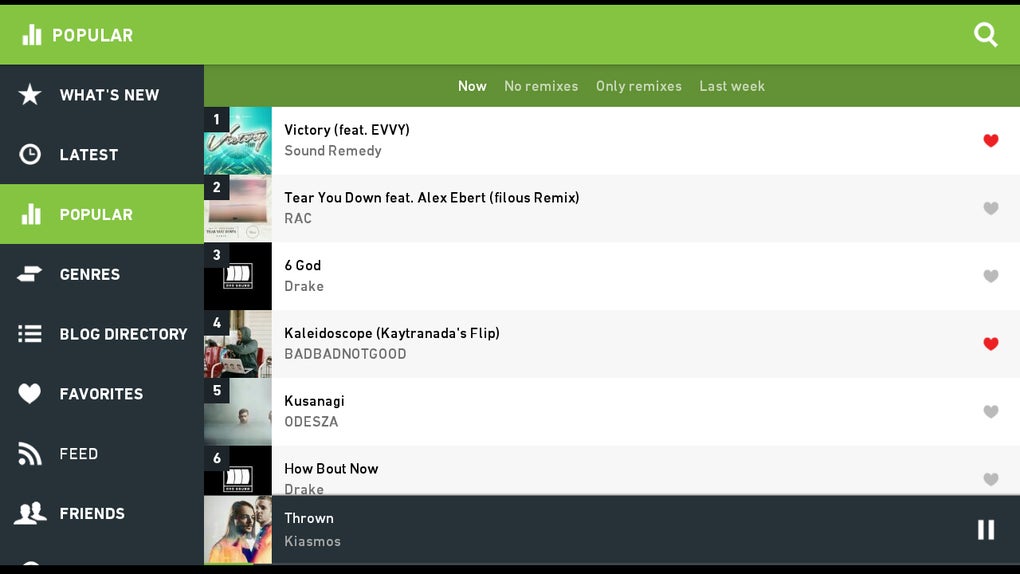
- Multiple Discovery Filters – Users can browse by What’s New, Latest, Popular, Genres, Favorites, and Listening History to tailor their experience.
- 30-Second Track Preview – A unique feature allowing users to sample the first 30 seconds of any track, ideal for quick evaluation.
- Blog Playlist Integration – Access curated playlists created by popular bloggers, organized by country and theme.
- Social Sharing & Purchase Links – Direct options to share songs on social networks and buy music via Google Play.
- Friend Activity Tracking – View what friends are listening to, fostering community engagement.
- Article Access – Read related blog posts and commentary directly within the app for deeper context on tracks.
These features collectively support efficient music exploration and content discovery. For example, a music curator can use genre filters and blog playlists to identify rising trends. A listener seeking novelty can use the 30-second preview to rapidly scan new releases.
The integration with external platforms like Google Play enhances the user journey from discovery to purchase. However, the app does not currently support playlist creation, which limits long-term music organization. Additionally, no recommendation engine exists to suggest similar tracks based on user preferences, a gap compared to platforms like Spotify.
User Interface, Workflow & Performance
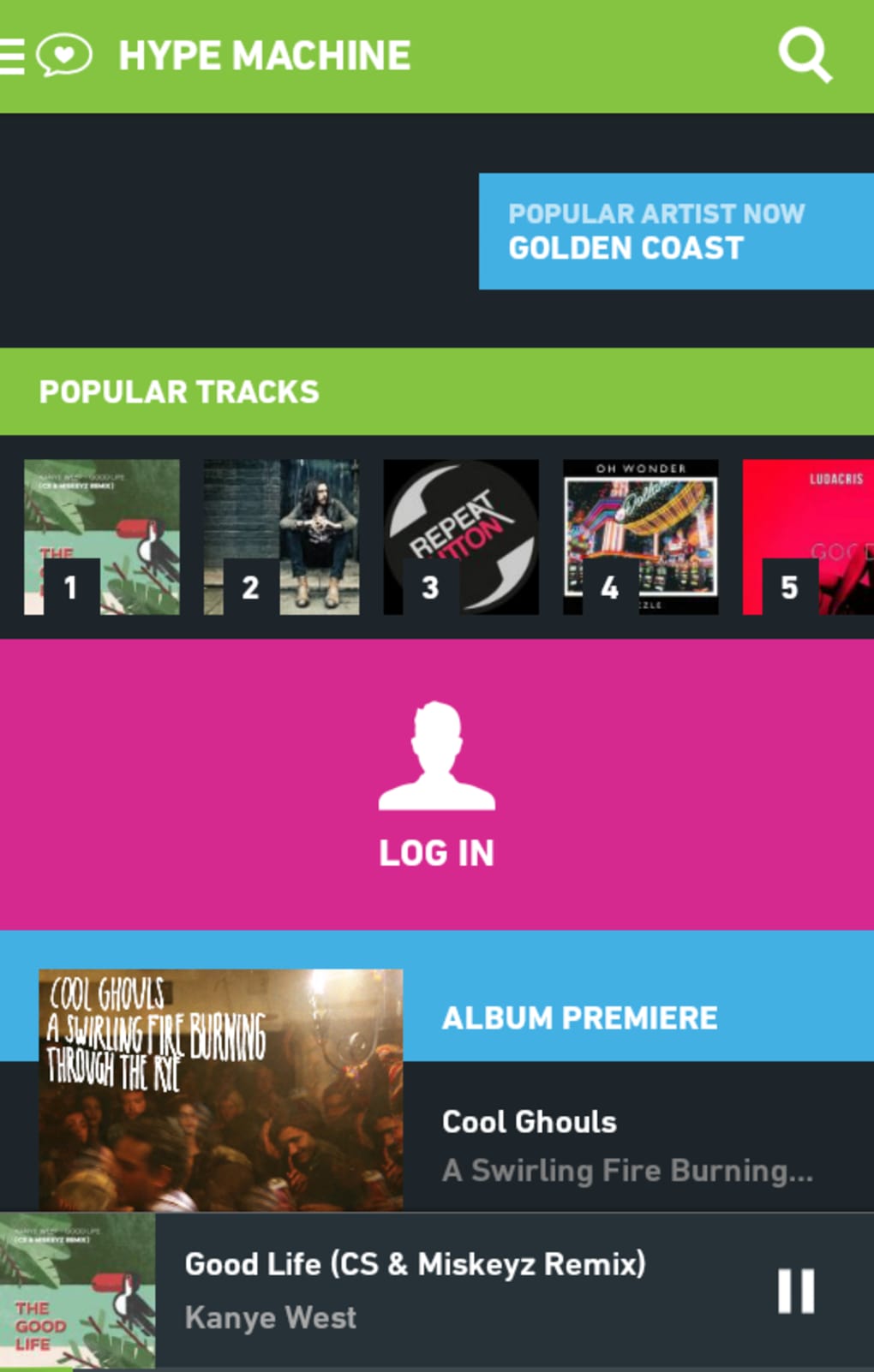
The user interface features a bright, colorful design with charcoal, green, and pink accents, drawing visual inspiration from popular music apps. Navigation is handled through a slide-out sidebar on the left, housing all main sections. While the layout is intuitive at a glance, the sidebar is described as overcrowded, with overlapping categories like What’s New and Latest, which could benefit from consolidation.
The workflow for discovering and playing music is generally straightforward, though some users have reported instability during playback. Performance observations are based on general software behavior patterns. The developer did not specify resource usage details, so CPU and RAM behavior remain unknown.
Some users have noted delays when skipping between tracks, with occasional playback interruptions where the app plays only one second of multiple songs before returning to the beginning. These issues suggest potential inefficiencies in audio buffering or stream handling. Stability appears inconsistent, particularly during searches.
The app functions without ads, but offline listening is not supported, requiring a constant data connection. Overall, the interface is visually engaging, but performance and workflow reliability need refinement.
Compatibility & System Requirements
The software is available for Windows and Mac operating systems, supporting both desktop platforms. The exact version number and installation size were not specified. The developer did not provide detailed system requirements.
Compatibility information was partially provided, indicating that the app runs on modern desktop environments. The absence of hardware requirements means users should rely on general system capabilities. The app does not appear to support offline use, meaning a stable internet connection is necessary at all times.
No information was provided about minimum processor speed, RAM, or disk space. Users are advised to ensure their system meets standard desktop application requirements for smooth operation. The developer did not specify whether the software supports touch-enabled devices or dual-monitor setups.
Pros and Cons
Pros
- Real-time access to music from global blogs and independent artists
- Unique 30-second track preview for rapid discovery
- Integration with popular music blogs and curated playlists
- Direct sharing and purchase links to Google Play
- Community features like friend activity tracking
- Ad-free experience with a one-time payment model
Cons
- No playlist creation or organization functionality
- Limited recommendation engine for personalized suggestions
- Occasional playback bugs and skipping delays
- Overcrowded navigation sidebar with redundant options
- No offline listening mode
- Missing radio or similar-track features
FAQ Section
Is Hype Machine available for Windows and Mac?
Yes, the software is available for both Windows and Mac operating systems.
Does Hype Machine require a constant internet connection?
Yes, the app does not support offline listening and requires an active data connection at all times.
Is Hype Machine free to use?
No, Hype Machine operates on a one-time payment model. There are no subscription fees or advertisements.
Can I create custom playlists in the app?
Currently, the app does not support playlist creation or organization. Favorites are limited to viewing saved tracks.
Does Hype Machine recommend music based on my listening habits?
Not at this time. The app does not feature a recommendation engine or algorithm to suggest similar artists or tracks.
Final Thoughts + CTA
Hype Machine delivers a compelling experience for music discovery, especially for those passionate about independent and emerging artists. Its global blog aggregation, real-time updates, and unique preview feature make it a valuable tool for curators, creators, and music lovers seeking fresh content. However, the lack of playlist support, recommendation systems, and occasional performance issues prevent it from being a fully mature solution.
While the one-time payment model is appealing and the interface is visually engaging, the app still requires refinement in stability and usability. For users focused on discovery over organization, Hype Machine is worth exploring. It’s not yet the complete music platform, but it’s a promising step forward.
Download Hype Machine now to experience the pulse of underground music.





.png)

